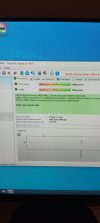
Merhaba arkadaşlar, Windows 10 yüklüydü, sürekli ekran donup bu hatayı veriyordu.
Windows 11 yükledim aynı hatayı tekrar veriyor. Neden olabilir acaba?
MiniDump dosyasi.

 drive.google.com
Windows 11 yükledim aynı hatayı tekrar veriyor. Neden olabilir acaba?
MiniDump dosyasi.
minidump.zip
drive.google.com
Microsoft (R) Windows Debugger Version 10.0.25200.1003 AMD64
Copyright (c) Microsoft Corporation. All rights reserved.
Loading Dump File [C:\Users\tamer\OneDrive\Masaüstü\021123-4796-01.dmp]
Mini Kernel Dump File: Only registers and stack trace are available
************* Path validation summary **************
Response Time (ms) Location
Deferred srv*
Symbol search path is: srv*
Executable search path is:
Windows 10 Kernel Version 19041 MP (12 procs) Free x64
Product: WinNt, suite: TerminalServer SingleUserTS
Edition build lab: 19041.1.amd64fre.vb_release.191206-1406
Machine Name:
Kernel base = 0xfffff807`70c00000 PsLoadedModuleList = 0xfffff807`7182a290
Debug session time: Sat Feb 11 16:41:50.150 2023 (UTC + 3:00)
System Uptime: 0 days 0:04:44.798
Loading Kernel Symbols
...............................................................
................................................................
........................................................
Loading User Symbols
Loading unloaded module list
.............
For analysis of this file, run !analyze -v
nt!KeBugCheckEx:
fffff807`70ff8fa0 48894c2408 mov qword ptr [rsp+8],rcx ss:0018:ffffc081`7bb1ac90=0000000000000101
8: kd> !analyze -v
*******************************************************************************
* *
* Bugcheck Analysis *
* *
*******************************************************************************
CLOCK_WATCHDOG_TIMEOUT (101)
An expected clock interrupt was not received on a secondary processor in an
MP system within the allocated interval. This indicates that the specified
processor is hung and not processing interrupts.
Arguments:
Arg1: 0000000000000010, Clock interrupt time out interval in nominal clock ticks.
Arg2: 0000000000000000, 0.
Arg3: ffffc0817b98d180, The PRCB address of the hung processor.
Arg4: 0000000000000006, The index of the hung processor.
Debugging Details:
------------------
*** WARNING: Unable to verify timestamp for win32k.sys
KEY_VALUES_STRING: 1
Key : Analysis.CPU.mSec
Value: 2765
Key : Analysis.DebugAnalysisManager
Value: Create
Key : Analysis.Elapsed.mSec
Value: 11980
Key : Analysis.IO.Other.Mb
Value: 0
Key : Analysis.IO.Read.Mb
Value: 0
Key : Analysis.IO.Write.Mb
Value: 0
Key : Analysis.Init.CPU.mSec
Value: 436
Key : Analysis.Init.Elapsed.mSec
Value: 2822
Key : Analysis.Memory.CommitPeak.Mb
Value: 86
Key : Bugcheck.Code.DumpHeader
Value: 0x101
Key : Bugcheck.Code.Register
Value: 0x101
Key : WER.OS.Branch
Value: vb_release
Key : WER.OS.Timestamp
Value: 2019-12-06T14:06:00Z
Key : WER.OS.Version
Value: 10.0.19041.1
FILE_IN_CAB: 021123-4796-01.dmp
BUGCHECK_CODE: 101
BUGCHECK_P1: 10
BUGCHECK_P2: 0
BUGCHECK_P3: ffffc0817b98d180
BUGCHECK_P4: 6
FAULTING_PROCESSOR: 6
FAULTING_THREAD: ffffa981c06da080
BLACKBOXBSD: 1 (!blackboxbsd)
BLACKBOXNTFS: 1 (!blackboxntfs)
BLACKBOXPNP: 1 (!blackboxpnp)
BLACKBOXWINLOGON: 1
CUSTOMER_CRASH_COUNT: 1
PROCESS_NAME: System
BAD_STACK_POINTER: ffffc0817b9b9410
STACK_TEXT:
ffffc081`7b9b9410 fffff807`71006e3c : 00000000`00000000 00000000`00000000 00000000`00000000 00000000`00000000 : nt!KiPageFault
ffffc081`7b9b9440 fffff807`71006e3c : 00000000`00000000 00000000`00000000 00000000`00000000 00000000`00000000 : nt!KiPageFault+0x3c
ffffc081`7b9b95d0 fffff807`71006e3c : 00000000`00000000 00000000`00000000 00000000`00000000 00000000`00000000 : nt!KiPageFault+0x3c
ffffc081`7b9b9760 fffff807`71006e3c : 00000000`00000000 00000000`00000000 00000000`00000000 00000000`00000000 : nt!KiPageFault+0x3c
ffffc081`7b9b98f0 fffff807`71006e3c : 00000000`00000000 00000000`00000000 00000000`00000000 00000000`00000000 : nt!KiPageFault+0x3c
ffffc081`7b9b9a80 fffff807`71006e3c : 00000000`00000000 00000000`00000000 00000000`00000000 00000000`00000000 : nt!KiPageFault+0x3c
ffffc081`7b9b9c10 fffff807`71006e3c : 00000000`00000000 00000000`00000000 00000000`00000000 00000000`00000000 : nt!KiPageFault+0x3c
ffffc081`7b9b9da0 fffff807`71006e3c : 00000000`00000000 00000000`00000000 00000000`00000000 00000000`00000000 : nt!KiPageFault+0x3c
ffffc081`7b9b9f30 fffff807`71006e3c : 0001b941`001d6ebc fd02e8d6`8b480000 fffc4225`e990ff7e 00000040`ba413a8b : nt!KiPageFault+0x3c
ffffc081`7b9ba0c0 fffff807`71006e3c : 205f8966`c82348c0 fd24cd0b`4922478a 4788050c`184f8948 400c3f24`22478a22 : nt!KiPageFault+0x3c
ffffc081`7b9ba250 fffff807`71006e3c : e9205689`49d50349 1ef0ba0f`fffc4cbe 89002e1d`69158d48 49fffc4d`fee91047 : nt!KiPageFault+0x3c
ffffc081`7b9ba3e0 fffff807`71006e3c : d6850f30`394c2041 89493189`4d000000 0d894c08`894c0841 18478b48`002de5cc : nt!KiPageFault+0x3c
ffffc081`7b9ba570 fffff807`71006e3c : 00b8888b`48000001 0000087c`81f70000 5998840f`00001000 8f840fdc`8441fffc : nt!KiPageFault+0x3c
ffffc081`7b9ba700 fffff807`71006e3c : e990ffd0`e33ae80d 7d453d83`fffc5f3d fc603986`0f050018 00000000`00ba48ff : nt!KiPageFault+0x3c
ffffc081`7b9ba890 fffff807`71006e3c : 001d9b10`058afffc 1d9b0b35`89660f24 1d9aff05`88500c00 0d80fffc`5f71e900 : nt!KiPageFault+0x3c
ffffc081`7b9baa20 fffff807`71006e3c : 00012050`e8ccff97 8d48fffc`5eb8e990 51202444`c7485b14 4c03e2c1`48000008 : nt!KiPageFault+0x3c
ffffc081`7b9babb0 fffff807`71006e3c : 244c8d48`90458948 8d48ff7b`8b82e878 e8884d8d`48782454 4808478b`ffce4994 : nt!KiPageFault+0x3c
ffffc081`7b9bad40 fffff807`71006e3c : 7be990ff`f3753be8 68244c8b`48fffc65 6be990ff`97ab8be8 000008bf`ccfffc65 : nt!KiPageFault+0x3c
ffffc081`7b9baed0 fffff807`71006e3c : 00009abb`fffc6fd6 0dbbfffc`7274e9c0 fffc726a`e9c00000 f84d8d4c`58458d48 : nt!KiPageFault+0x3c
ffffc081`7b9bb060 fffff807`71006e3c : 74694d45`bafffc76 87e990ff`f37213e8 74694d45`bafffc76 fff37200`e8cb8b48 : nt!KiPageFault+0x3c
ffffc081`7b9bb1f0 fffff807`71006e3c : c9854808`498b48ff fc7ecfe9`f9450f48 fc8094e9`c032ccff 75e9fb8a`4401b3ff : nt!KiPageFault+0x3c
ffffc081`7b9bb380 00000000`00000000 : 00000000`00000000 00000000`00000000 00000000`00000000 00000000`00000000 : nt!KiPageFault+0x3c
SYMBOL_NAME: nt!KiPageFault+3c
MODULE_NAME: nt
IMAGE_NAME: ntkrnlmp.exe
IMAGE_VERSION: 10.0.19041.2006
STACK_COMMAND: .process /r /p 0xffffa981c42e0340; .thread 0xffffa981c06da080 ; kb
BUCKET_ID_FUNC_OFFSET: 3c
FAILURE_BUCKET_ID: CLOCK_WATCHDOG_TIMEOUT_INTERRUPTS_DISABLED_STACKPTR_ERROR_nt!KiPageFault
OS_VERSION: 10.0.19041.1
BUILDLAB_STR: vb_release
OSPLATFORM_TYPE: x64
OSNAME: Windows 10
FAILURE_ID_HASH: {e60d7807-5730-e0ca-55b3-3b4f578c8903}
Followup: MachineOwner
---------
Son düzenleme: