4060 7840HS sistem mavi ekran veriyor

Merhaba.

Sorun RAM belleklerle bağlantılı görünüyor.

Alınan BAD_POOL_CALLER ve MEMORY_MANAGEMENT hataları bunu destekler nitelikte.

TPM ile bağlantısı var ancak TPM modülünden gelen bilgiler RAM bellekte yanlış yorumlanıyor, yanlış veri havuzunda işlenmeye çalışılıyor.
BAD_POOL_CALLER bu anlama gelir; işlem parçacığı yani threadler, erişmemesi gereken veri havuzuna erişmeye çalışıyordur.

Kod:
BAD_POOL_CALLER (c2)
The current thread is making a bad pool request.  Typically this is at a bad IRQL level or double freeing the same allocation, etc.
Arguments:
Arg1: 000000000000000d, Attempt to release quota on a corrupted pool allocation.
Arg2: ffffd70d25a82410, Address of pool
Arg3: 00000000506d7054, Pool allocation's tag
Arg4: 00000000d0ec4205, Quota process pointer (bad).

Debugging Details:
------------------


KEY_VALUES_STRING: 1

    Key  : Analysis.CPU.mSec
    Value: 1437

    Key  : Analysis.Elapsed.mSec
    Value: 1456

    Key  : Analysis.IO.Other.Mb
    Value: 0

    Key  : Analysis.IO.Read.Mb
    Value: 1

    Key  : Analysis.IO.Write.Mb
    Value: 25

    Key  : Analysis.Init.CPU.mSec
    Value: 1328

    Key  : Analysis.Init.Elapsed.mSec
    Value: 161786

    Key  : Analysis.Memory.CommitPeak.Mb
    Value: 109

    Key  : Analysis.Version.DbgEng
    Value: 10.0.29482.1003

    Key  : Analysis.Version.Description
    Value: 10.2509.29.03 amd64fre

    Key  : Analysis.Version.Ext
    Value: 1.2509.29.3

    Key  : Bugcheck.Code.LegacyAPI
    Value: 0xc2

    Key  : Bugcheck.Code.TargetModel
    Value: 0xc2

    Key  : Dump.Attributes.AsUlong
    Value: 0x21008

    Key  : Dump.Attributes.DiagDataWrittenToHeader
    Value: 1

    Key  : Dump.Attributes.ErrorCode
    Value: 0x0

    Key  : Dump.Attributes.KernelGeneratedTriageDump
    Value: 1

    Key  : Dump.Attributes.LastLine
    Value: Dump completed successfully.

    Key  : Dump.Attributes.ProgressPercentage
    Value: 0

    Key  : Failure.Bucket
    Value: 0xc2_d_tpm!Tpm20Resource::_scalar_deleting_destructor_

    Key  : Failure.Exception.IP.Address
    Value: 0xfffff80782b63dc6

    Key  : Failure.Exception.IP.Module
    Value: nt

    Key  : Failure.Exception.IP.Offset
    Value: 0xb63dc6

    Key  : Failure.Hash
    Value: {91db07c7-7710-80a4-de7a-d91ead109b25}

    Key  : Faulting.IP.Type
    Value: Paged

    Key  : WER.System.BIOSRevision
    Value: 15.29.0.0


BUGCHECK_CODE:  c2

BUGCHECK_P1: d

BUGCHECK_P2: ffffd70d25a82410

BUGCHECK_P3: 506d7054

BUGCHECK_P4: d0ec4205

FILE_IN_CAB:  090325-27000-01.dmp

DUMP_FILE_ATTRIBUTES: 0x21008
  Kernel Generated Triage Dump

FAULTING_THREAD:  ffffc70344de4040

BLACKBOXBSD: 1 (!blackboxbsd)


BLACKBOXNTFS: 1 (!blackboxntfs)


BLACKBOXPNP: 1 (!blackboxpnp)


BLACKBOXWINLOGON: 1 (!blackboxwinlogon)


CUSTOMER_CRASH_COUNT:  1

PROCESS_NAME:  System

IP_IN_PAGED_CODE:
nt!ExFreePoolWithTag+10f6
fffff807`82b63dc6 cc              int     3

STACK_TEXT:
ffffc080`9b944f48 fffff807`82b63dc6     : 00000000`000000c2 00000000`0000000d ffffd70d`25a82410 00000000`506d7054 : nt!KeBugCheckEx
ffffc080`9b944f50 fffff807`1475a6db     : ffffd70d`25a82410 ffffd70d`25a82420 ffffd70d`07000000 ffffc080`9b9450e1 : nt!ExFreePoolWithTag+0x10f6
ffffc080`9b945050 fffff807`1475a006     : ffffc703`42970de0 ffffc080`9b945200 00000005`00000075 00000165`00000000 : tpm!Tpm20Resource::`scalar deleting destructor'+0x27
ffffc080`9b945080 fffff807`14759fbf     : 00000000`00000000 ffffc080`00000001 fffff807`147988a0 00000289`5e1b1e01 : tpm!Tpm20Context::DeleteTpm20Resource+0xe
ffffc080`9b9450b0 fffff807`147573ad     : 00000000`00000000 fffff807`14798098 ffffd70d`532366d0 ffffd70d`53236700 : tpm!Tpm20ResourceMgr::RemovedLoadedResource+0x8f
ffffc080`9b9450f0 fffff807`14769b25     : ffffd70d`075c2ab0 ffffd70d`00000000 ffffc080`9b945199 ffffd70d`0759b414 : tpm!Tpm20ResourceMgr::ProcessUpdatedTpmState+0x199
ffffc080`9b945130 fffff807`14769ff0     : ffffd70d`075c2ab0 00000000`00000009 ffffc080`9b948002 fffff807`00000000 : tpm!Tpm20ResourceMgr::SubmitRequest+0x9d5
ffffc080`9b945200 fffff807`1476b002     : ffffc080`9b945430 ffffc703`43bfe520 00000000`00000001 00000000`00000000 : tpm!Tpm20Scheduler::DoUserRequest+0x220
ffffc080`9b945330 fffff807`14769128     : 00000000`00000000 ffffc703`43bfe520 fffff807`147690e0 ffffc703`43bfe520 : tpm!Tpm20Scheduler::SchedulerThreadFunction+0x7e2
ffffc080`9b945540 fffff807`82487c2a     : ffffc703`44de4040 fffff807`147690e0 00000000`00000000 ffff8101`e2da6180 : tpm!Tpm20Scheduler::SchedulerThreadWrapper+0x48
ffffc080`9b945570 fffff807`826a0ad4     : ffff8101`e2da6180 ffffc703`44de4040 fffff807`82487bd0 00000000`00000000 : nt!PspSystemThreadStartup+0x5a
ffffc080`9b9455c0 00000000`00000000     : ffffc080`9b946000 ffffc080`9b93f000 00000000`00000000 00000000`00000000 : nt!KiStartSystemThread+0x34


SYMBOL_NAME:  tpm!Tpm20Resource::`scalar deleting destructor'+27

MODULE_NAME: tpm

IMAGE_NAME:  tpm.sys

IMAGE_VERSION:  10.0.26100.5074

STACK_COMMAND: .process /r /p 0xffffc70342704040; .thread 0xffffc70344de4040 ; kb

BUCKET_ID_FUNC_OFFSET:  27

FAILURE_BUCKET_ID:  0xc2_d_tpm!Tpm20Resource::_scalar_deleting_destructor_

OSPLATFORM_TYPE:  x64

OSNAME:  Windows 10

FAILURE_ID_HASH:  {91db07c7-7710-80a4-de7a-d91ead109b25}

Followup:     MachineOwner
---------

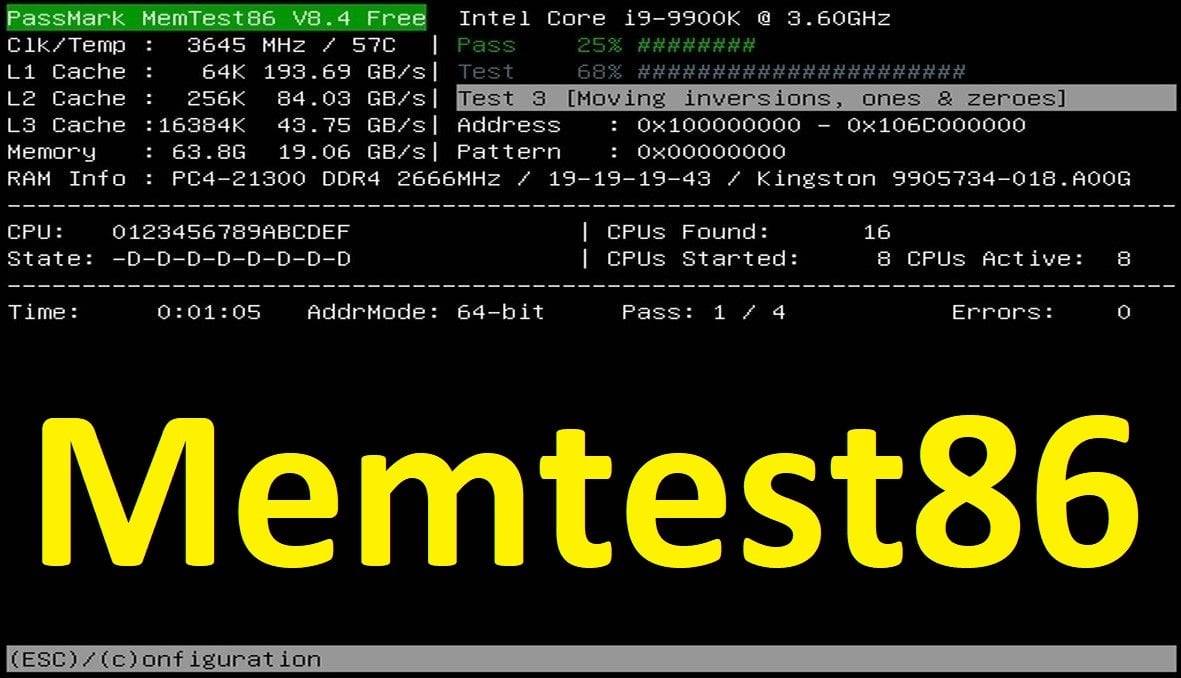
RAM belleklere uygulanan herhangi bir hız aşırtma işlemi varsa kaldırınız. XMP veya DOCP özelliği açılabiliyorsa devre dışı bırakınız ve belleklerinizi MemTest86 ile taramadan geçiriniz.


Laptop modeliniz Victus 16-S0047NT olarak görünüyor, doğru mudur?

Ek olarak Bluetooth sürücünüzü güncelleyiniz.
NVIDIA ekran kartı sürücüsüne dair bileşenler görünüyor. Ancak çok kritik değil gibi, şimdilik işlem yapmamız gerekmiyor.
 
Merhaba.

Sorun RAM belleklerle bağlantılı görünüyor.

Alınan BAD_POOL_CALLER ve MEMORY_MANAGEMENT hataları bunu destekler nitelikte.

TPM ile bağlantısı var ancak TPM modülünden gelen bilgiler RAM bellekte yanlış yorumlanıyor, yanlış veri havuzunda işlenmeye çalışılıyor.
BAD_POOL_CALLER bu anlama gelir; işlem parçacığı yani threadler, erişmemesi gereken veri havuzuna erişmeye çalışıyordur.

Kod:
BAD_POOL_CALLER (c2)
The current thread is making a bad pool request.  Typically this is at a bad IRQL level or double freeing the same allocation, etc.
Arguments:
Arg1: 000000000000000d, Attempt to release quota on a corrupted pool allocation.
Arg2: ffffd70d25a82410, Address of pool
Arg3: 00000000506d7054, Pool allocation's tag
Arg4: 00000000d0ec4205, Quota process pointer (bad).

Debugging Details:
------------------


KEY_VALUES_STRING: 1

    Key  : Analysis.CPU.mSec
    Value: 1437

    Key  : Analysis.Elapsed.mSec
    Value: 1456

    Key  : Analysis.IO.Other.Mb
    Value: 0

    Key  : Analysis.IO.Read.Mb
    Value: 1

    Key  : Analysis.IO.Write.Mb
    Value: 25

    Key  : Analysis.Init.CPU.mSec
    Value: 1328

    Key  : Analysis.Init.Elapsed.mSec
    Value: 161786

    Key  : Analysis.Memory.CommitPeak.Mb
    Value: 109

    Key  : Analysis.Version.DbgEng
    Value: 10.0.29482.1003

    Key  : Analysis.Version.Description
    Value: 10.2509.29.03 amd64fre

    Key  : Analysis.Version.Ext
    Value: 1.2509.29.3

    Key  : Bugcheck.Code.LegacyAPI
    Value: 0xc2

    Key  : Bugcheck.Code.TargetModel
    Value: 0xc2

    Key  : Dump.Attributes.AsUlong
    Value: 0x21008

    Key  : Dump.Attributes.DiagDataWrittenToHeader
    Value: 1

    Key  : Dump.Attributes.ErrorCode
    Value: 0x0

    Key  : Dump.Attributes.KernelGeneratedTriageDump
    Value: 1

    Key  : Dump.Attributes.LastLine
    Value: Dump completed successfully.

    Key  : Dump.Attributes.ProgressPercentage
    Value: 0

    Key  : Failure.Bucket
    Value: 0xc2_d_tpm!Tpm20Resource::_scalar_deleting_destructor_

    Key  : Failure.Exception.IP.Address
    Value: 0xfffff80782b63dc6

    Key  : Failure.Exception.IP.Module
    Value: nt

    Key  : Failure.Exception.IP.Offset
    Value: 0xb63dc6

    Key  : Failure.Hash
    Value: {91db07c7-7710-80a4-de7a-d91ead109b25}

    Key  : Faulting.IP.Type
    Value: Paged

    Key  : WER.System.BIOSRevision
    Value: 15.29.0.0


BUGCHECK_CODE:  c2

BUGCHECK_P1: d

BUGCHECK_P2: ffffd70d25a82410

BUGCHECK_P3: 506d7054

BUGCHECK_P4: d0ec4205

FILE_IN_CAB:  090325-27000-01.dmp

DUMP_FILE_ATTRIBUTES: 0x21008
  Kernel Generated Triage Dump

FAULTING_THREAD:  ffffc70344de4040

BLACKBOXBSD: 1 (!blackboxbsd)


BLACKBOXNTFS: 1 (!blackboxntfs)


BLACKBOXPNP: 1 (!blackboxpnp)


BLACKBOXWINLOGON: 1 (!blackboxwinlogon)


CUSTOMER_CRASH_COUNT:  1

PROCESS_NAME:  System

IP_IN_PAGED_CODE:
nt!ExFreePoolWithTag+10f6
fffff807`82b63dc6 cc              int     3

STACK_TEXT:
ffffc080`9b944f48 fffff807`82b63dc6     : 00000000`000000c2 00000000`0000000d ffffd70d`25a82410 00000000`506d7054 : nt!KeBugCheckEx
ffffc080`9b944f50 fffff807`1475a6db     : ffffd70d`25a82410 ffffd70d`25a82420 ffffd70d`07000000 ffffc080`9b9450e1 : nt!ExFreePoolWithTag+0x10f6
ffffc080`9b945050 fffff807`1475a006     : ffffc703`42970de0 ffffc080`9b945200 00000005`00000075 00000165`00000000 : tpm!Tpm20Resource::`scalar deleting destructor'+0x27
ffffc080`9b945080 fffff807`14759fbf     : 00000000`00000000 ffffc080`00000001 fffff807`147988a0 00000289`5e1b1e01 : tpm!Tpm20Context::DeleteTpm20Resource+0xe
ffffc080`9b9450b0 fffff807`147573ad     : 00000000`00000000 fffff807`14798098 ffffd70d`532366d0 ffffd70d`53236700 : tpm!Tpm20ResourceMgr::RemovedLoadedResource+0x8f
ffffc080`9b9450f0 fffff807`14769b25     : ffffd70d`075c2ab0 ffffd70d`00000000 ffffc080`9b945199 ffffd70d`0759b414 : tpm!Tpm20ResourceMgr::ProcessUpdatedTpmState+0x199
ffffc080`9b945130 fffff807`14769ff0     : ffffd70d`075c2ab0 00000000`00000009 ffffc080`9b948002 fffff807`00000000 : tpm!Tpm20ResourceMgr::SubmitRequest+0x9d5
ffffc080`9b945200 fffff807`1476b002     : ffffc080`9b945430 ffffc703`43bfe520 00000000`00000001 00000000`00000000 : tpm!Tpm20Scheduler::DoUserRequest+0x220
ffffc080`9b945330 fffff807`14769128     : 00000000`00000000 ffffc703`43bfe520 fffff807`147690e0 ffffc703`43bfe520 : tpm!Tpm20Scheduler::SchedulerThreadFunction+0x7e2
ffffc080`9b945540 fffff807`82487c2a     : ffffc703`44de4040 fffff807`147690e0 00000000`00000000 ffff8101`e2da6180 : tpm!Tpm20Scheduler::SchedulerThreadWrapper+0x48
ffffc080`9b945570 fffff807`826a0ad4     : ffff8101`e2da6180 ffffc703`44de4040 fffff807`82487bd0 00000000`00000000 : nt!PspSystemThreadStartup+0x5a
ffffc080`9b9455c0 00000000`00000000     : ffffc080`9b946000 ffffc080`9b93f000 00000000`00000000 00000000`00000000 : nt!KiStartSystemThread+0x34


SYMBOL_NAME:  tpm!Tpm20Resource::`scalar deleting destructor'+27

MODULE_NAME: tpm

IMAGE_NAME:  tpm.sys

IMAGE_VERSION:  10.0.26100.5074

STACK_COMMAND: .process /r /p 0xffffc70342704040; .thread 0xffffc70344de4040 ; kb

BUCKET_ID_FUNC_OFFSET:  27

FAILURE_BUCKET_ID:  0xc2_d_tpm!Tpm20Resource::_scalar_deleting_destructor_

OSPLATFORM_TYPE:  x64

OSNAME:  Windows 10

FAILURE_ID_HASH:  {91db07c7-7710-80a4-de7a-d91ead109b25}

Followup:     MachineOwner
---------

RAM belleklere uygulanan herhangi bir hız aşırtma işlemi varsa kaldırınız. XMP veya DOCP özelliği açılabiliyorsa devre dışı bırakınız ve belleklerinizi MemTest86 ile taramadan geçiriniz.


Laptop modeliniz Victus 16-S0047NT olarak görünüyor, doğru mudur?

Ek olarak Bluetooth sürücünüzü güncelleyiniz.
NVIDIA ekran kartı sürücüsüne dair bileşenler görünüyor. Ancak çok kritik değil gibi, şimdilik işlem yapmamız gerekmiyor.
Ben hala TPM ile ilgili oldugu kanaatindeyim. BIOS uzerinden TPM devre disi birakilarak kimin hakli oldugu kolaylikla gorulebilir. Eger TPM devre disi birakildiginda BSOD'ler durur ise, ben hakliyim. Eger TPM devre disi birakildiginda BSOD'ler devam eder ise, siz haklisiniz.
 
@gtc2007 İnsanız, yanılabiliriz.

Ancak aynı içerikle, aynı hataları taşıyan bazı konuları çözüdğümde RAM bellek kaynaklı çıkan şekilde çözüme kavuşturmuştum.


Dökümleri tam okumadığınızı düşünüyorum, yorumunuz doğru ancak bilgi eksiği var.
Saygılarımla.

@ertu38 merhaba. Dönüş yapabilir misiniz?
 
Son düzenleme:

Bu konuyu görüntüleyen kullanıcılar

Technopat Haberler

Yeni konular

Geri
Yukarı