Gamegararaj X5t mavi ekran hatası veriyor

DESMOND54

Centipat
Katılım
22 Aralık 2023
Mesajlar
22
Daha fazla  
Cinsiyet
Erkek
Mavi ekran ilk defa almıyorum ama birkaç gün önce bilgisayara format attım düzelir diye. Siteden driverları kurdum Windows Update attım BIOS Update attım. Ekran kartını Experience aracılığı ile de güncelledim. Bugün yine mavi ekran aldım. Minidump dosya analizinden anlayan birisi sorunumu çözebilir mi? Yoksa geri göndereceğim iade alacağım.
 
Son düzenleyen: Moderatör:
Merhaba.

Dosyalarınızı, eğer oluştuysa bu rehberi ve rehberdeki siteleri kullanarak bizlerle paylaşabilir misiniz?
 
Merhaba.

Dosyalarınızı, eğer oluştuysa bu rehberi ve rehberdeki siteleri kullanarak bizlerle paylaşabilir misiniz?
https://drive.google.com/file/d/1DDWgVHDt3q3MJyWE7PIS1td-xDQwOmMC/view?usp=sharing Drive Google a yükledim buyrun.
 
Dosyalarınızı indirme için erişime açabilir misiniz?
 
Dosyalarınızı indirme için erişime açabilir misiniz?
Kusura bakmayın ilk defa yükledim. Nasıl yapacağımı öğrenip hemen düzelteceğim.
 
Bir erişim hatası nedeniyle mavi ekrana düşmüş sistem.

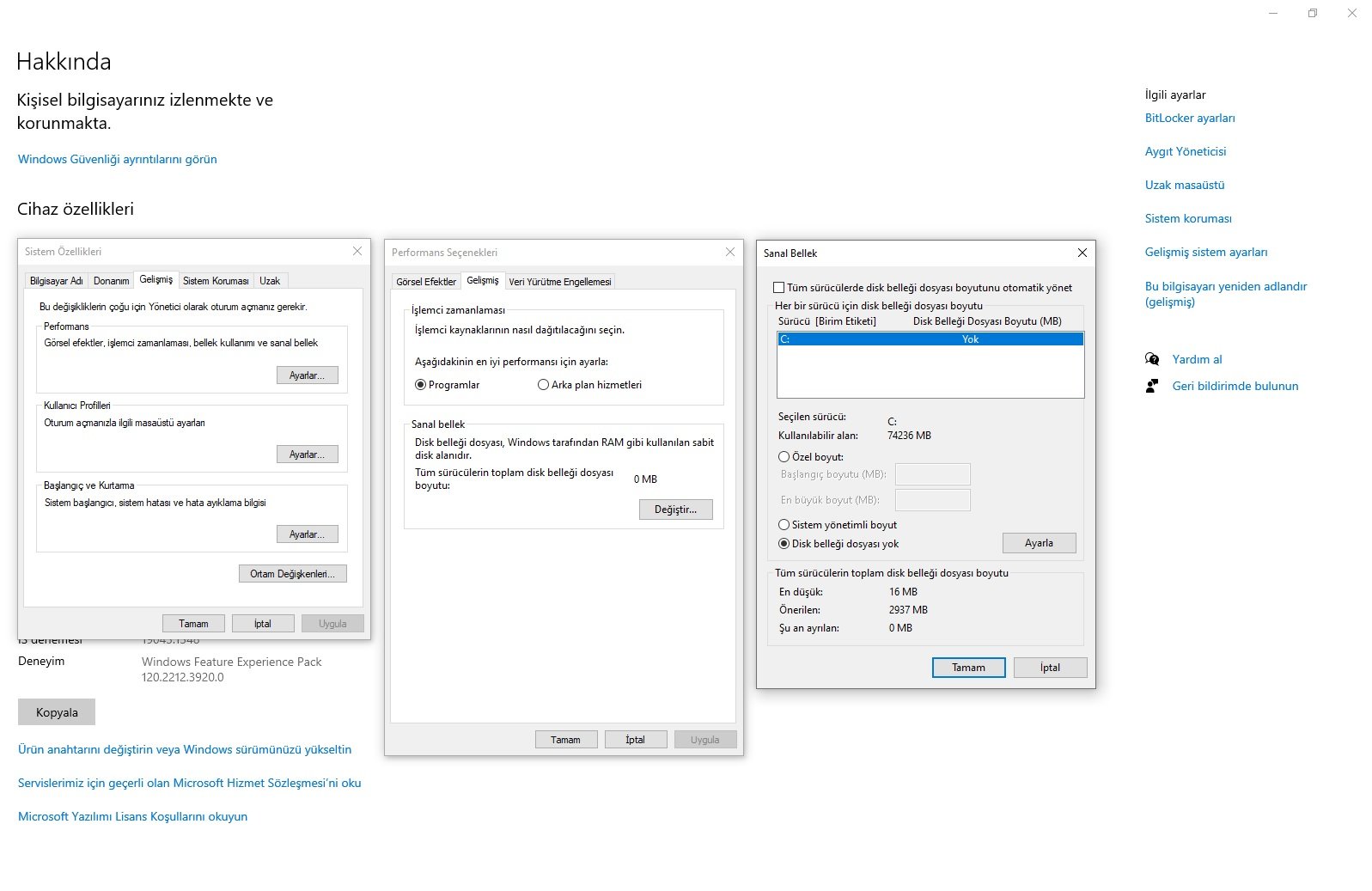
Sanal bellek açık görünüyor. Sanal belleği kapattıktan sonra RAM bellek ve disklerinizi testten geçirelim.
Sanal bellek kullanımı için disk alanından belirli bir bölüm alınır.

Bu rehberi takip ederek sanal belleği kapatabilirsiniz.

Kod:
IRQL_NOT_LESS_OR_EQUAL (a)
An attempt was made to access a pageable (or completely invalid) address at an
interrupt request level (IRQL) that is too high.  This is usually
caused by drivers using improper addresses.
If a kernel debugger is available get the stack backtrace.
Arguments:
Arg1: 00005b8baa2df010, memory referenced
Arg2: 0000000000000002, IRQL
Arg3: 0000000000000000, bitfield :
    bit 0 : value 0 = read operation, 1 = write operation
    bit 3 : value 0 = not an execute operation, 1 = execute operation (only on chips which support this level of status)
Arg4: fffff804cdc26b6f, address which referenced memory

Debugging Details:
------------------


KEY_VALUES_STRING: 1

    Key  : Analysis.CPU.mSec
    Value: 3593

    Key  : Analysis.Elapsed.mSec
    Value: 22593

    Key  : Analysis.IO.Other.Mb
    Value: 0

    Key  : Analysis.IO.Read.Mb
    Value: 1

    Key  : Analysis.IO.Write.Mb
    Value: 1

    Key  : Analysis.Init.CPU.mSec
    Value: 1171

    Key  : Analysis.Init.Elapsed.mSec
    Value: 38122

    Key  : Analysis.Memory.CommitPeak.Mb
    Value: 107

    Key  : Analysis.Version.DbgEng
    Value: 10.0.29457.1000

    Key  : Analysis.Version.Description
    Value: 10.2506.23.01 amd64fre

    Key  : Analysis.Version.Ext
    Value: 1.2506.23.1

    Key  : Bugcheck.Code.LegacyAPI
    Value: 0xa

    Key  : Bugcheck.Code.TargetModel
    Value: 0xa

    Key  : Dump.Attributes.AsUlong
    Value: 0x21808

    Key  : Dump.Attributes.DiagDataWrittenToHeader
    Value: 1

    Key  : Dump.Attributes.ErrorCode
    Value: 0x0

    Key  : Dump.Attributes.KernelGeneratedTriageDump
    Value: 1

    Key  : Dump.Attributes.LastLine
    Value: Dump completed successfully.

    Key  : Dump.Attributes.ProgressPercentage
    Value: 0

    Key  : Failure.Bucket
    Value: AV_nt!MiGetPageProtection

    Key  : Failure.Exception.IP.Address
    Value: 0xfffff804cdc26b6f

    Key  : Failure.Exception.IP.Module
    Value: nt

    Key  : Failure.Exception.IP.Offset
    Value: 0x226b6f

    Key  : Failure.Hash
    Value: {41372a35-237d-1281-82f6-8f5f9bf6044a}

    Key  : Hypervisor.Enlightenments.ValueHex
    Value: 0x7417df84

    Key  : Hypervisor.Flags.AnyHypervisorPresent
    Value: 1

    Key  : Hypervisor.Flags.ApicEnlightened
    Value: 0

    Key  : Hypervisor.Flags.ApicVirtualizationAvailable
    Value: 1

    Key  : Hypervisor.Flags.AsyncMemoryHint
    Value: 0

    Key  : Hypervisor.Flags.CoreSchedulerRequested
    Value: 0

    Key  : Hypervisor.Flags.CpuManager
    Value: 1

    Key  : Hypervisor.Flags.DeprecateAutoEoi
    Value: 1

    Key  : Hypervisor.Flags.DynamicCpuDisabled
    Value: 1

    Key  : Hypervisor.Flags.Epf
    Value: 0

    Key  : Hypervisor.Flags.ExtendedProcessorMasks
    Value: 1

    Key  : Hypervisor.Flags.HardwareMbecAvailable
    Value: 1

    Key  : Hypervisor.Flags.MaxBankNumber
    Value: 0

    Key  : Hypervisor.Flags.MemoryZeroingControl
    Value: 0

    Key  : Hypervisor.Flags.NoExtendedRangeFlush
    Value: 0

    Key  : Hypervisor.Flags.NoNonArchCoreSharing
    Value: 1

    Key  : Hypervisor.Flags.Phase0InitDone
    Value: 1

    Key  : Hypervisor.Flags.PowerSchedulerQos
    Value: 0

    Key  : Hypervisor.Flags.RootScheduler
    Value: 0

    Key  : Hypervisor.Flags.SynicAvailable
    Value: 1

    Key  : Hypervisor.Flags.UseQpcBias
    Value: 0

    Key  : Hypervisor.Flags.Value
    Value: 55185662

    Key  : Hypervisor.Flags.ValueHex
    Value: 0x34a10fe

    Key  : Hypervisor.Flags.VpAssistPage
    Value: 1

    Key  : Hypervisor.Flags.VsmAvailable
    Value: 1

    Key  : Hypervisor.RootFlags.AccessStats
    Value: 1

    Key  : Hypervisor.RootFlags.CrashdumpEnlightened
    Value: 1

    Key  : Hypervisor.RootFlags.CreateVirtualProcessor
    Value: 1

    Key  : Hypervisor.RootFlags.DisableHyperthreading
    Value: 0

    Key  : Hypervisor.RootFlags.HostTimelineSync
    Value: 1

    Key  : Hypervisor.RootFlags.HypervisorDebuggingEnabled
    Value: 0

    Key  : Hypervisor.RootFlags.IsHyperV
    Value: 1

    Key  : Hypervisor.RootFlags.LivedumpEnlightened
    Value: 1

    Key  : Hypervisor.RootFlags.MapDeviceInterrupt
    Value: 1

    Key  : Hypervisor.RootFlags.MceEnlightened
    Value: 1

    Key  : Hypervisor.RootFlags.Nested
    Value: 0

    Key  : Hypervisor.RootFlags.StartLogicalProcessor
    Value: 1

    Key  : Hypervisor.RootFlags.Value
    Value: 1015

    Key  : Hypervisor.RootFlags.ValueHex
    Value: 0x3f7

    Key  : WER.System.BIOSRevision
    Value: 5.32.0.0


BUGCHECK_CODE:  a

BUGCHECK_P1: 5b8baa2df010

BUGCHECK_P2: 2

BUGCHECK_P3: 0

BUGCHECK_P4: fffff804cdc26b6f

FILE_IN_CAB:  120625-22125-01.dmp

TAG_NOT_DEFINED_202b:  *** Unknown TAG in analysis list 202b


DUMP_FILE_ATTRIBUTES: 0x21808
  Kernel Generated Triage Dump

FAULTING_THREAD:  ffffb40edfdf1040

READ_ADDRESS: fffff804ce9c44c0: Unable to get MiVisibleState
Unable to get NonPagedPoolStart
Unable to get NonPagedPoolEnd
Unable to get PagedPoolStart
Unable to get PagedPoolEnd
unable to get nt!MmSpecialPagesInUse
 00005b8baa2df010

BLACKBOXBSD: 1 (!blackboxbsd)


BLACKBOXNTFS: 1 (!blackboxntfs)


BLACKBOXWINLOGON: 1 (!blackboxwinlogon)


CUSTOMER_CRASH_COUNT:  1

PROCESS_NAME:  msedgewebview2

STACK_TEXT: 
ffffee87`2bff71f8 fffff804`ce0b2be9     : 00000000`0000000a 00005b8b`aa2df010 00000000`00000002 00000000`00000000 : nt!KeBugCheckEx
ffffee87`2bff7200 fffff804`ce0adea8     : 00000001`00000000 00000000`00000001 5b8baa2d`ff500c00 00000736`ecc7288c : nt!KiBugCheckDispatch+0x69
ffffee87`2bff7340 fffff804`cdc26b6f     : fffffd3f`fd91e910 db8baa40`7e400400 00000000`00000000 ffffee87`2bff7710 : nt!KiPageFault+0x468
ffffee87`2bff74d0 fffff804`cdc2558f     : fffffd3f`fd91e940 00000000`00000000 00000000`00000000 ffffee87`2bff7640 : nt!MiGetPageProtection+0x5ef
ffffee87`2bff7540 fffff804`cdd99b4d     : ffffb40e`d7600000 fffffd3f`fd91e940 ffffb40e`cb6d2500 ffffb40e`cb6d25c0 : nt!MiQueryAddressState+0x42f
ffffee87`2bff7710 fffff804`ce3c8d16     : 00000000`00000000 ffffee87`2bff0000 00000000`00000001 ffffb40e`00000000 : nt!MiQueryAddressSpan+0xc5
ffffee87`2bff77c0 fffff804`ce3c8625     : 00000000`00000000 00000000`00000000 00000000`00000000 00000000`00000000 : nt!MmQueryVirtualMemory+0x6d6
ffffee87`2bff7960 fffff804`ce0b2255     : 00000000`00000000 00000000`5add1c01 ffffee87`2bff7aa0 00000053`069ff538 : nt!NtQueryVirtualMemory+0x25
ffffee87`2bff79b0 00007ffb`26042124     : 00000000`00000000 00000000`00000000 00000000`00000000 00000000`00000000 : nt!KiSystemServiceCopyEnd+0x25
00000053`069fe768 00000000`00000000     : 00000000`00000000 00000000`00000000 00000000`00000000 00000000`00000000 : 0x00007ffb`26042124


SYMBOL_NAME:  nt!MiGetPageProtection+5ef

MODULE_NAME: nt

IMAGE_VERSION:  10.0.26100.7171

STACK_COMMAND: .process /r /p 0xffffb40edd60c080; .thread 0xffffb40edfdf1040 ; kb

IMAGE_NAME:  ntkrnlmp.exe

BUCKET_ID_FUNC_OFFSET:  5ef

FAILURE_BUCKET_ID:  AV_nt!MiGetPageProtection

OSPLATFORM_TYPE:  x64

OSNAME:  Windows 10

FAILURE_ID_HASH:  {41372a35-237d-1281-82f6-8f5f9bf6044a}

Followup:     MachineOwner
---------

HD Tune 5.75 programını indirerek sisteme bağlı tüm disklere "Quick Scan" tiki kapalı şekilde "Error Scan" uygulayınız ve test sonrasında sonuçlarıyla "Health" menülerini paylaşınız.
 
Bir erişim hatası nedeniyle mavi ekrana düşmüş sistem.

Sanal bellek açık görünüyor. Sanal belleği kapattıktan sonra RAM bellek ve disklerinizi testten geçirelim.
Sanal bellek kullanımı için disk alanından belirli bir bölüm alınır.

Bu rehberi takip ederek sanal belleği kapatabilirsiniz.

Kod:
IRQL_NOT_LESS_OR_EQUAL (a)
An attempt was made to access a pageable (or completely invalid) address at an
interrupt request level (IRQL) that is too high.  This is usually
caused by drivers using improper addresses.
If a kernel debugger is available get the stack backtrace.
Arguments:
Arg1: 00005b8baa2df010, memory referenced
Arg2: 0000000000000002, IRQL
Arg3: 0000000000000000, bitfield :
    bit 0 : value 0 = read operation, 1 = write operation
    bit 3 : value 0 = not an execute operation, 1 = execute operation (only on chips which support this level of status)
Arg4: fffff804cdc26b6f, address which referenced memory

Debugging Details:
------------------


KEY_VALUES_STRING: 1

    Key  : Analysis.CPU.mSec
    Value: 3593

    Key  : Analysis.Elapsed.mSec
    Value: 22593

    Key  : Analysis.IO.Other.Mb
    Value: 0

    Key  : Analysis.IO.Read.Mb
    Value: 1

    Key  : Analysis.IO.Write.Mb
    Value: 1

    Key  : Analysis.Init.CPU.mSec
    Value: 1171

    Key  : Analysis.Init.Elapsed.mSec
    Value: 38122

    Key  : Analysis.Memory.CommitPeak.Mb
    Value: 107

    Key  : Analysis.Version.DbgEng
    Value: 10.0.29457.1000

    Key  : Analysis.Version.Description
    Value: 10.2506.23.01 amd64fre

    Key  : Analysis.Version.Ext
    Value: 1.2506.23.1

    Key  : Bugcheck.Code.LegacyAPI
    Value: 0xa

    Key  : Bugcheck.Code.TargetModel
    Value: 0xa

    Key  : Dump.Attributes.AsUlong
    Value: 0x21808

    Key  : Dump.Attributes.DiagDataWrittenToHeader
    Value: 1

    Key  : Dump.Attributes.ErrorCode
    Value: 0x0

    Key  : Dump.Attributes.KernelGeneratedTriageDump
    Value: 1

    Key  : Dump.Attributes.LastLine
    Value: Dump completed successfully.

    Key  : Dump.Attributes.ProgressPercentage
    Value: 0

    Key  : Failure.Bucket
    Value: AV_nt!MiGetPageProtection

    Key  : Failure.Exception.IP.Address
    Value: 0xfffff804cdc26b6f

    Key  : Failure.Exception.IP.Module
    Value: nt

    Key  : Failure.Exception.IP.Offset
    Value: 0x226b6f

    Key  : Failure.Hash
    Value: {41372a35-237d-1281-82f6-8f5f9bf6044a}

    Key  : Hypervisor.Enlightenments.ValueHex
    Value: 0x7417df84

    Key  : Hypervisor.Flags.AnyHypervisorPresent
    Value: 1

    Key  : Hypervisor.Flags.ApicEnlightened
    Value: 0

    Key  : Hypervisor.Flags.ApicVirtualizationAvailable
    Value: 1

    Key  : Hypervisor.Flags.AsyncMemoryHint
    Value: 0

    Key  : Hypervisor.Flags.CoreSchedulerRequested
    Value: 0

    Key  : Hypervisor.Flags.CpuManager
    Value: 1

    Key  : Hypervisor.Flags.DeprecateAutoEoi
    Value: 1

    Key  : Hypervisor.Flags.DynamicCpuDisabled
    Value: 1

    Key  : Hypervisor.Flags.Epf
    Value: 0

    Key  : Hypervisor.Flags.ExtendedProcessorMasks
    Value: 1

    Key  : Hypervisor.Flags.HardwareMbecAvailable
    Value: 1

    Key  : Hypervisor.Flags.MaxBankNumber
    Value: 0

    Key  : Hypervisor.Flags.MemoryZeroingControl
    Value: 0

    Key  : Hypervisor.Flags.NoExtendedRangeFlush
    Value: 0

    Key  : Hypervisor.Flags.NoNonArchCoreSharing
    Value: 1

    Key  : Hypervisor.Flags.Phase0InitDone
    Value: 1

    Key  : Hypervisor.Flags.PowerSchedulerQos
    Value: 0

    Key  : Hypervisor.Flags.RootScheduler
    Value: 0

    Key  : Hypervisor.Flags.SynicAvailable
    Value: 1

    Key  : Hypervisor.Flags.UseQpcBias
    Value: 0

    Key  : Hypervisor.Flags.Value
    Value: 55185662

    Key  : Hypervisor.Flags.ValueHex
    Value: 0x34a10fe

    Key  : Hypervisor.Flags.VpAssistPage
    Value: 1

    Key  : Hypervisor.Flags.VsmAvailable
    Value: 1

    Key  : Hypervisor.RootFlags.AccessStats
    Value: 1

    Key  : Hypervisor.RootFlags.CrashdumpEnlightened
    Value: 1

    Key  : Hypervisor.RootFlags.CreateVirtualProcessor
    Value: 1

    Key  : Hypervisor.RootFlags.DisableHyperthreading
    Value: 0

    Key  : Hypervisor.RootFlags.HostTimelineSync
    Value: 1

    Key  : Hypervisor.RootFlags.HypervisorDebuggingEnabled
    Value: 0

    Key  : Hypervisor.RootFlags.IsHyperV
    Value: 1

    Key  : Hypervisor.RootFlags.LivedumpEnlightened
    Value: 1

    Key  : Hypervisor.RootFlags.MapDeviceInterrupt
    Value: 1

    Key  : Hypervisor.RootFlags.MceEnlightened
    Value: 1

    Key  : Hypervisor.RootFlags.Nested
    Value: 0

    Key  : Hypervisor.RootFlags.StartLogicalProcessor
    Value: 1

    Key  : Hypervisor.RootFlags.Value
    Value: 1015

    Key  : Hypervisor.RootFlags.ValueHex
    Value: 0x3f7

    Key  : WER.System.BIOSRevision
    Value: 5.32.0.0


BUGCHECK_CODE:  a

BUGCHECK_P1: 5b8baa2df010

BUGCHECK_P2: 2

BUGCHECK_P3: 0

BUGCHECK_P4: fffff804cdc26b6f

FILE_IN_CAB:  120625-22125-01.dmp

TAG_NOT_DEFINED_202b:  *** Unknown TAG in analysis list 202b


DUMP_FILE_ATTRIBUTES: 0x21808
  Kernel Generated Triage Dump

FAULTING_THREAD:  ffffb40edfdf1040

READ_ADDRESS: fffff804ce9c44c0: Unable to get MiVisibleState
Unable to get NonPagedPoolStart
Unable to get NonPagedPoolEnd
Unable to get PagedPoolStart
Unable to get PagedPoolEnd
unable to get nt!MmSpecialPagesInUse
 00005b8baa2df010

BLACKBOXBSD: 1 (!blackboxbsd)


BLACKBOXNTFS: 1 (!blackboxntfs)


BLACKBOXWINLOGON: 1 (!blackboxwinlogon)


CUSTOMER_CRASH_COUNT:  1

PROCESS_NAME:  msedgewebview2

STACK_TEXT:
ffffee87`2bff71f8 fffff804`ce0b2be9     : 00000000`0000000a 00005b8b`aa2df010 00000000`00000002 00000000`00000000 : nt!KeBugCheckEx
ffffee87`2bff7200 fffff804`ce0adea8     : 00000001`00000000 00000000`00000001 5b8baa2d`ff500c00 00000736`ecc7288c : nt!KiBugCheckDispatch+0x69
ffffee87`2bff7340 fffff804`cdc26b6f     : fffffd3f`fd91e910 db8baa40`7e400400 00000000`00000000 ffffee87`2bff7710 : nt!KiPageFault+0x468
ffffee87`2bff74d0 fffff804`cdc2558f     : fffffd3f`fd91e940 00000000`00000000 00000000`00000000 ffffee87`2bff7640 : nt!MiGetPageProtection+0x5ef
ffffee87`2bff7540 fffff804`cdd99b4d     : ffffb40e`d7600000 fffffd3f`fd91e940 ffffb40e`cb6d2500 ffffb40e`cb6d25c0 : nt!MiQueryAddressState+0x42f
ffffee87`2bff7710 fffff804`ce3c8d16     : 00000000`00000000 ffffee87`2bff0000 00000000`00000001 ffffb40e`00000000 : nt!MiQueryAddressSpan+0xc5
ffffee87`2bff77c0 fffff804`ce3c8625     : 00000000`00000000 00000000`00000000 00000000`00000000 00000000`00000000 : nt!MmQueryVirtualMemory+0x6d6
ffffee87`2bff7960 fffff804`ce0b2255     : 00000000`00000000 00000000`5add1c01 ffffee87`2bff7aa0 00000053`069ff538 : nt!NtQueryVirtualMemory+0x25
ffffee87`2bff79b0 00007ffb`26042124     : 00000000`00000000 00000000`00000000 00000000`00000000 00000000`00000000 : nt!KiSystemServiceCopyEnd+0x25
00000053`069fe768 00000000`00000000     : 00000000`00000000 00000000`00000000 00000000`00000000 00000000`00000000 : 0x00007ffb`26042124


SYMBOL_NAME:  nt!MiGetPageProtection+5ef

MODULE_NAME: nt

IMAGE_VERSION:  10.0.26100.7171

STACK_COMMAND: .process /r /p 0xffffb40edd60c080; .thread 0xffffb40edfdf1040 ; kb

IMAGE_NAME:  ntkrnlmp.exe

BUCKET_ID_FUNC_OFFSET:  5ef

FAILURE_BUCKET_ID:  AV_nt!MiGetPageProtection

OSPLATFORM_TYPE:  x64

OSNAME:  Windows 10

FAILURE_ID_HASH:  {41372a35-237d-1281-82f6-8f5f9bf6044a}

Followup:     MachineOwner
---------

HD Tune 5.75 programını indirerek sisteme bağlı tüm disklere "Quick Scan" tiki kapalı şekilde "Error Scan" uygulayınız ve test sonrasında sonuçlarıyla "Health" menülerini paylaşınız.
Sanal bellek kapatma işlemini gerçekleştirdim. HD Tune için siteye girdim, yanlışlık olmaması için soruyorum. 5.75 den daha üst sürüm var, 5.75 indireceğim yinede değil mi? İndirdikten sonra sistemi yeniden başlatıp test aşamasına geçeceğim.
 

Bu konuyu görüntüleyen kullanıcılar

Technopat Haberler

Geri
Yukarı