SYSTEM_THREAD_EXCEPTION_NOT_HANDLED hatası

Supermenokan

Decapat
Katılım
24 Nisan 2023
Mesajlar
176
Daha fazla  
Sistem Özellikleri
12Th Gen İ5 12400-RTX 3060Tİ VENTUS 2X OC- KİNSGTON FURY BEAST 6000 MHZ
Cinsiyet
Erkek
Meslek
Serbest Meslek Erbabı
Bazen böyle bir hata alıyorum, restart atıyor. Bazen de hatasız restart atıyor. Ne yaptıysam düzeltemedim.
 

Dosya Ekleri

  • 20260109_174954(0).jpg
    20260109_174954(0).jpg
    85,6 KB · Görüntüleme: 16
Son düzenleyen: Moderatör:
Olmamış hocam.

Text dosyası ile analiz gerçekleştiremem.

Baştan alalım ancak dikkatlice anlayıp takip etmeye çalışın.
  1. Minidump klasöründeki dosyayı, masaüstünüzde boş bir yere kopyalayın. Taşıma işlemi yapmayın.
  2. Kopyaladığınız dosyayı sağ tık yapıp sıkıştır diyerek ZIP veya 7Z formatında sıkıştırın.
  3. Bu klasörü; rehberde belirtilen Google Drive, OneDrive, Yndex Disk gibi platformlara yükleyip linkini buraya atın.


Umarım başarabilmişimdir bu konularda biraz bilgisizmdir de.
 
Dosyalara erişebildim, devam :)

WINLOGON_FATAL_ERROR hatası alınmış. Normalde bu hatada neredeyse hiç Minidump dökümü oluşmaz, çok nadirdir.

Sistemin güç durumu değişirken hataya düşmüş. Winlogon zaten Windows'un açılış sürecinde çalışan bir servistir, sistem açılırken güç durumu kaynaklı hata alınmış.

CLOCK_WATCHDOG_TIMEOUT alınmış. Sistemde OC veya UV gibi işlemler mevcut mu? Gerçi döküm özelinde, interrupt yani "yürütme kesme" süreciyle alakalı sıkıntı yaşandığı görülüyor.

Bir de MEMORY_MANAGEMENT hatası alındığı görülmekte.

RAM belleklere uyguladığınız bir hız aşırtma, frekans artışı var mı? Varsa sistem stabil çalışmıyor olabilir.
Eğer yoksa, RAM bellek özelinde bir arıza olabilir.

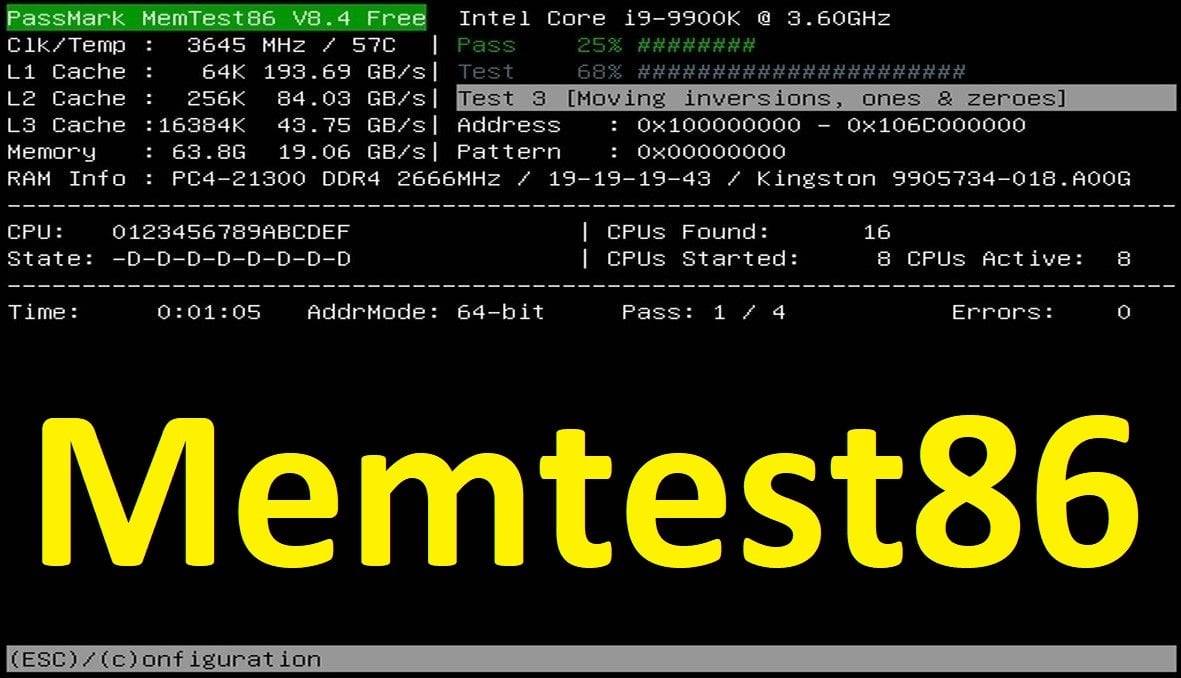
MemTest86 ile her halükarda testten geçirmekte fayda var; rehbere göre test yapmanızı rica edeceğim.

Not: Test yapılırken XMP/DOCP profilleri açıksa kaldırınız. Hız aşırtma uygulandıysa varsayılan ayarlara çekiniz.

Kod:
MEMORY_MANAGEMENT (1a)
    # Any other values for parameter 1 must be individually examined.
Arguments:
Arg1: 0000000000041792, A corrupt PTE has been detected. Parameter 2 contains the address of
    the PTE. Parameters 3/4 contain the low/high parts of the PTE.
Arg2: ffff833ffc7fa488
Arg3: 0000000000000004
Arg4: 0000000000000000

Debugging Details:
------------------


KEY_VALUES_STRING: 1

    Key  : Analysis.CPU.mSec
    Value: 1062

    Key  : Analysis.Elapsed.mSec
    Value: 1060

    Key  : Analysis.IO.Other.Mb
    Value: 0

    Key  : Analysis.IO.Read.Mb
    Value: 1

    Key  : Analysis.IO.Write.Mb
    Value: 0

    Key  : Analysis.Init.CPU.mSec
    Value: 734

    Key  : Analysis.Init.Elapsed.mSec
    Value: 22668

    Key  : Analysis.Memory.CommitPeak.Mb
    Value: 107

    Key  : Analysis.Version.DbgEng
    Value: 10.0.29482.1003

    Key  : Analysis.Version.Description
    Value: 10.2509.29.03 amd64fre

    Key  : Analysis.Version.Ext
    Value: 1.2509.29.3

    Key  : Bugcheck.Code.LegacyAPI
    Value: 0x1a

    Key  : Bugcheck.Code.TargetModel
    Value: 0x1a

    Key  : Dump.Attributes.AsUlong
    Value: 0x21808

    Key  : Dump.Attributes.DiagDataWrittenToHeader
    Value: 1

    Key  : Dump.Attributes.ErrorCode
    Value: 0x0

    Key  : Dump.Attributes.KernelGeneratedTriageDump
    Value: 1

    Key  : Dump.Attributes.LastLine
    Value: Dump completed successfully.

    Key  : Dump.Attributes.ProgressPercentage
    Value: 0

    Key  : Failure.Bucket
    Value: MEMORY_CORRUPTION_ONE_BIT

    Key  : Failure.Hash
    Value: {e3faf315-c3d0-81db-819a-6c43d23c63a7}

    Key  : Hypervisor.Enlightenments.ValueHex
    Value: 0x7417df84

    Key  : Hypervisor.Flags.AnyHypervisorPresent
    Value: 1

    Key  : Hypervisor.Flags.ApicEnlightened
    Value: 0

    Key  : Hypervisor.Flags.ApicVirtualizationAvailable
    Value: 1

    Key  : Hypervisor.Flags.AsyncMemoryHint
    Value: 0

    Key  : Hypervisor.Flags.CoreSchedulerRequested
    Value: 0

    Key  : Hypervisor.Flags.CpuManager
    Value: 1

    Key  : Hypervisor.Flags.DeprecateAutoEoi
    Value: 1

    Key  : Hypervisor.Flags.DynamicCpuDisabled
    Value: 1

    Key  : Hypervisor.Flags.Epf
    Value: 0

    Key  : Hypervisor.Flags.ExtendedProcessorMasks
    Value: 1

    Key  : Hypervisor.Flags.HardwareMbecAvailable
    Value: 1

    Key  : Hypervisor.Flags.MaxBankNumber
    Value: 0

    Key  : Hypervisor.Flags.MemoryZeroingControl
    Value: 0

    Key  : Hypervisor.Flags.NoExtendedRangeFlush
    Value: 0

    Key  : Hypervisor.Flags.NoNonArchCoreSharing
    Value: 1

    Key  : Hypervisor.Flags.Phase0InitDone
    Value: 1

    Key  : Hypervisor.Flags.PowerSchedulerQos
    Value: 0

    Key  : Hypervisor.Flags.RootScheduler
    Value: 0

    Key  : Hypervisor.Flags.SynicAvailable
    Value: 1

    Key  : Hypervisor.Flags.UseQpcBias
    Value: 0

    Key  : Hypervisor.Flags.Value
    Value: 55185662

    Key  : Hypervisor.Flags.ValueHex
    Value: 0x34a10fe

    Key  : Hypervisor.Flags.VpAssistPage
    Value: 1

    Key  : Hypervisor.Flags.VsmAvailable
    Value: 1

    Key  : Hypervisor.RootFlags.AccessStats
    Value: 1

    Key  : Hypervisor.RootFlags.CrashdumpEnlightened
    Value: 1

    Key  : Hypervisor.RootFlags.CreateVirtualProcessor
    Value: 1

    Key  : Hypervisor.RootFlags.DisableHyperthreading
    Value: 0

    Key  : Hypervisor.RootFlags.HostTimelineSync
    Value: 1

    Key  : Hypervisor.RootFlags.HypervisorDebuggingEnabled
    Value: 0

    Key  : Hypervisor.RootFlags.IsHyperV
    Value: 1

    Key  : Hypervisor.RootFlags.LivedumpEnlightened
    Value: 1

    Key  : Hypervisor.RootFlags.MapDeviceInterrupt
    Value: 1

    Key  : Hypervisor.RootFlags.MceEnlightened
    Value: 1

    Key  : Hypervisor.RootFlags.Nested
    Value: 0

    Key  : Hypervisor.RootFlags.StartLogicalProcessor
    Value: 1

    Key  : Hypervisor.RootFlags.Value
    Value: 1015

    Key  : Hypervisor.RootFlags.ValueHex
    Value: 0x3f7

    Key  : MemoryManagement.PFN
    Value: 0x0

    Key  : WER.System.BIOSRevision
    Value: 32.5.0.0


BUGCHECK_CODE:  1a

BUGCHECK_P1: 41792

BUGCHECK_P2: ffff833ffc7fa488

BUGCHECK_P3: 4

BUGCHECK_P4: 0

FILE_IN_CAB:  010926-6546-01.dmp

TAG_NOT_DEFINED_202b:  *** Unknown TAG in analysis list 202b


DUMP_FILE_ATTRIBUTES: 0x21808
  Kernel Generated Triage Dump

FAULTING_THREAD:  ffff988c58f91080

MEMORY_CORRUPTOR:  ONE_BIT

BLACKBOXBSD: 1 (!blackboxbsd)


BLACKBOXNTFS: 1 (!blackboxntfs)


BLACKBOXWINLOGON: 1 (!blackboxwinlogon)


CUSTOMER_CRASH_COUNT:  1

PROCESS_NAME:  WerFault.exe

STACK_TEXT: 
ffffb888`03046ed8 fffff802`cb4b1602     : 00000000`0000001a 00000000`00041792 ffff833f`fc7fa488 00000000`00000004 : nt!KeBugCheckEx
ffffb888`03046ee0 fffff802`cb40f853     : 00000000`00000000 00000000`00000004 ffffb888`030471e0 00000000`00000001 : nt!MiDecommitHandlePageFileFormatPte+0x242
ffffb888`03046f40 fffff802`cb40e211     : ffffb888`03047120 ffff8341`a0d06830 00000000`00000082 ffff988c`58f3b480 : nt!MiDeleteVa+0x473
ffffb888`03046fb0 fffff802`cb61370a     : 00000000`00000000 ffff988c`00000000 ffffb888`00000082 ffffffff`ffffffff : nt!MiDeleteVaDirect+0x2b1
ffffb888`030470d0 fffff802`cb61352b     : 00007ff8`ff572fff fffff802`cb46c492 ffff988c`58f91080 00000000`00000000 : nt!MiDeletePagablePteRange+0x1b6
ffffb888`03047390 fffff802`cbadbe98     : 00000000`00000000 ffffb888`03047450 00000000`00000000 ffff988c`61f53b9f : nt!MiDeleteVirtualAddresses+0x4b
ffffb888`030473e0 fffff802`cbadbc69     : ffff988c`58f3b080 ffff988c`63f08780 ffff988c`00000000 00000000`00000000 : nt!MiDeleteVad+0x168
ffffb888`03047490 fffff802`cbadbbef     : ffff988c`63f08780 00000000`00000000 ffff988c`58f91080 00000000`00000000 : nt!MiUnmapVad+0x49
ffffb888`030474c0 fffff802`cbc0982f     : ffff988c`63f08d20 ffff988c`58f91080 ffff988c`58f91080 ffff988c`58f91080 : nt!MiCleanVad+0x2b
ffffb888`030474f0 fffff802`cba9f54a     : ffff988c`00000000 ffff988c`58f3b268 ffffb888`03047660 00000000`00000000 : nt!MmCleanProcessAddressSpace+0xfb
ffffb888`03047570 fffff802`cbb2da96     : ffff988c`58f3b080 ffff988c`58f3b080 ffffb888`03047660 00000000`00000000 : nt!PspRundownSingleProcess+0xc2
ffffb888`03047600 fffff802`cba9ecc2     : 0000005d`374fe000 00000000`00000000 ffffb888`03047838 ffff988c`58f91080 : nt!PspExitLastThread+0xe6
ffffb888`03047690 fffff802`cba9e4f4     : ffffb888`0304785c ffff988c`58f91001 ffff988c`62910140 ffff8781`78779180 : nt!PspExitThread+0x5e2
ffffb888`03047790 fffff802`cb52e42f     : 00000007`00000101 0000005d`3732fbd8 00000000`00000000 ffff988c`61d516d0 : nt!KiSchedulerApcTerminate+0x34
ffffb888`030477d0 fffff802`cb8a6c90     : 00007ff9`04e98280 ffffb888`03047870 00000000`00000000 00000000`00000000 : nt!KiDeliverApc+0x4af
ffffb888`03047870 fffff802`cb8b570d     : 00000000`00000000 ffff988c`6331c680 ffffb888`03047a00 00000000`00000000 : nt!KiInitiateUserApc+0x70
ffffb888`030479b0 00007ff9`04f25874     : 00000000`00000000 00000000`00000000 00000000`00000000 00000000`00000000 : nt!KiSystemServiceExit+0xad
0000005d`3732fb78 00000000`00000000     : 00000000`00000000 00000000`00000000 00000000`00000000 00000000`00000000 : 0x00007ff9`04f25874


MODULE_NAME: hardware

IMAGE_NAME:  memory_corruption

STACK_COMMAND: .process /r /p 0xffff988c58f3b080; .thread 0xffff988c58f91080 ; kb

FAILURE_BUCKET_ID:  MEMORY_CORRUPTION_ONE_BIT

OSPLATFORM_TYPE:  x64

OSNAME:  Windows 10

FAILURE_ID_HASH:  {e3faf315-c3d0-81db-819a-6c43d23c63a7}

Followup:     MachineOwner
---------

@Supermenokan
 
Son düzenleme:
Dosyalara erişebildim, devam :)

WINLOGON_FATAL_ERROR hatası alınmış. Normalde bu hatada neredeyse hiç minidump dökümü oluşmaz, çok nadirdir.

Sistemin güç durumu değişirken hataya düşmüş. Winlogon zaten Windows'un açılış sürecinde çalışan bir servistir, sistem açılırken güç durumu kaynaklı hata alınmış.

CLOCK_WATCHDOG_TIMEOUT alınmış. Sistemde OC veya UV gibi işlemler mevcut mu? Gerçi döküm özelinde, interrupt yani "yürütme kesme" süreciyle alakalı sıkıntı yaşandığı görülüyor.

Bir de MEMORY_MANAGEMENT hatası alındığı görülmekte.

RAM belleklere uyguladığınız bir hız aşırtma, frekans artışı var mı? Varsa sistem stabil çalışmıyor olabilir.
Eğer yoksa, RAM bellek özelinde bir arıza olabilir.

MemTest86 ile her halükarda testten geçirmekte fayda var; rehbere göre test yapmanızı rica edeceğim.

not: Test yapılırken XMP/DOCP profilleri açıksa kaldırınız. Hız aşırtma uygulandıysa varsayılan ayarlara çekiniz.

Kod:
MEMORY_MANAGEMENT (1a)
 # Any other values for parameter 1 must be individually examined.
Arguments:
Arg1: 0000000000041792, A corrupt PTE has been detected. Parameter 2 contains the address of.
 the PTE. Parameters 3/4 contain the low/high parts of the PTE.
Arg2: ffff833ffc7fa488.
Arg3: 0000000000000004.
Arg4: 0000000000000000.

Debugging Details:
------------------

KEY_VALUES_STRING: 1

 Key : Analysis.CPU.mSec
 Value: 1062.

 Key : Analysis.Elapsed.mSec
 Value: 1060.

 Key : Analysis.IO.Other.Mb
 Value: 0

 Key : Analysis.IO.Read.Mb
 Value: 1

 Key : Analysis.IO.Write.Mb
 Value: 0

 Key : Analysis.Init.CPU.mSec
 Value: 734.

 Key : Analysis.Init.Elapsed.mSec
 Value: 22668.

 Key : Analysis.Memory.CommitPeak.Mb
 Value: 107.

 Key : Analysis.Version.DbgEng
 Value: 10.0.29482.1003

 Key : Analysis.Version.Description
 Value: 10.2509.29.03 amd64fre.

 Key : Analysis.Version.Ext
 Value: 1.2509.29.3

 Key : Bugcheck.Code.LegacyAPI
 Value: 0x1a.

 Key : Bugcheck.Code.TargetModel
 Value: 0x1a.

 Key : Dump.Attributes.AsUlong
 Value: 0x21808.

 Key : Dump.Attributes.DiagDataWrittenToHeader
 Value: 1

 Key : Dump.Attributes.ErrorCode
 Value: 0x0.

 Key : Dump.Attributes.KernelGeneratedTriageDump
 Value: 1

 Key : Dump.Attributes.LastLine
 Value: Dump completed successfully.

 Key : Dump.Attributes.ProgressPercentage
 Value: 0

 Key : Failure.Bucket
 Value: MEMORY_CORRUPTION_ONE_BIT

 Key : Failure.Hash
 Value: {e3faf315-c3d0-81db-819a-6c43d23c63a7}

 Key : Hypervisor.Enlightenments.ValueHex
 Value: 0x7417df84.

 Key : Hypervisor.Flags.AnyHypervisorPresent
 Value: 1

 Key : Hypervisor.Flags.ApicEnlightened
 Value: 0

 Key : Hypervisor.Flags.ApicVirtualizationAvailable
 Value: 1

 Key : Hypervisor.Flags.AsyncMemoryHint
 Value: 0

 Key : Hypervisor.Flags.CoreSchedulerRequested
 Value: 0

 Key : Hypervisor.Flags.CpuManager
 Value: 1

 Key : Hypervisor.Flags.DeprecateAutoEoi
 Value: 1

 Key : Hypervisor.Flags.DynamicCpuDisabled
 Value: 1

 Key : Hypervisor.Flags.Epf
 Value: 0

 Key : Hypervisor.Flags.ExtendedProcessorMasks
 Value: 1

 Key : Hypervisor.Flags.HardwareMbecAvailable
 Value: 1

 Key : Hypervisor.Flags.MaxBankNumber
 Value: 0

 Key : Hypervisor.Flags.MemoryZeroingControl
 Value: 0

 Key : Hypervisor.Flags.NoExtendedRangeFlush
 Value: 0

 Key : Hypervisor.Flags.NoNonArchCoreSharing
 Value: 1

 Key : Hypervisor.Flags.Phase0InitDone
 Value: 1

 Key : Hypervisor.Flags.PowerSchedulerQos
 Value: 0

 Key : Hypervisor.Flags.RootScheduler
 Value: 0

 Key : Hypervisor.Flags.SynicAvailable
 Value: 1

 Key : Hypervisor.Flags.UseQpcBias
 Value: 0

 Key : Hypervisor.Flags.Value
 Value: 55185662.

 Key : Hypervisor.Flags.ValueHex
 Value: 0x34a10fe.

 Key : Hypervisor.Flags.VpAssistPage
 Value: 1

 Key : Hypervisor.Flags.VsmAvailable
 Value: 1

 Key : Hypervisor.RootFlags.AccessStats
 Value: 1

 Key : Hypervisor.RootFlags.CrashdumpEnlightened
 Value: 1

 Key : Hypervisor.RootFlags.CreateVirtualProcessor
 Value: 1

 Key : Hypervisor.RootFlags.DisableHyperthreading
 Value: 0

 Key : Hypervisor.RootFlags.HostTimelineSync
 Value: 1

 Key : Hypervisor.RootFlags.HypervisorDebuggingEnabled
 Value: 0

 Key : Hypervisor.RootFlags.IsHyperV
 Value: 1

 Key : Hypervisor.RootFlags.LivedumpEnlightened
 Value: 1

 Key : Hypervisor.RootFlags.MapDeviceInterrupt
 Value: 1

 Key : Hypervisor.RootFlags.MceEnlightened
 Value: 1

 Key : Hypervisor.RootFlags.Nested
 Value: 0

 Key : Hypervisor.RootFlags.StartLogicalProcessor
 Value: 1

 Key : Hypervisor.RootFlags.Value
 Value: 1015.

 Key : Hypervisor.RootFlags.ValueHex
 Value: 0x3f7.

 Key : MemoryManagement.PFN
 Value: 0x0.

 Key : WER.System.BIOSRevision
 Value: 32.5.0.0

BUGCHECK_CODE: 1a.

BUGCHECK_P1: 41792.

BUGCHECK_P2: ffff833ffc7fa488.

BUGCHECK_P3: 4

BUGCHECK_P4: 0

FILE_IN_CAB: 010926-6546-01.dmp

TAG_NOT_DEFINED_202b: *** Unknown TAG in analysis list 202b.

DUMP_FILE_ATTRIBUTES: 0x21808.
 Kernel Generated Triage Dump.

FAULTING_THREAD: ffff988c58f91080.

MEMORY_CORRUPTOR: ONE_BIT.

BLACKBOXBSD: 1 (!blackboxbsd)

BLACKBOXNTFS: 1 (!blackboxntfs)

BLACKBOXWINLOGON: 1 (!blackboxwinlogon)

CUSTOMER_CRASH_COUNT: 1

PROCESS_NAME: WerFault.exe

STACK_TEXT:
ffffb888`03046ed8 fffff802`cb4b1602 : 00000000`0000001a 00000000`00041792 ffff833f`fc7fa488 00000000`00000004 : nt!KeBugCheckEx
ffffb888`03046ee0 fffff802`cb40f853 : 00000000`00000000 00000000`00000004 ffffb888`030471e0 00000000`00000001 : nt!MiDecommitHandlePageFileFormatPte+0x242
ffffb888`03046f40 fffff802`cb40e211 : ffffb888`03047120 ffff8341`a0d06830 00000000`00000082 ffff988c`58f3b480 : nt!MiDeleteVa+0x473
ffffb888`03046fb0 fffff802`cb61370a : 00000000`00000000 ffff988c`00000000 ffffb888`00000082 ffffffff`ffffffff : nt!MiDeleteVaDirect+0x2b1
ffffb888`030470d0 fffff802`cb61352b : 00007ff8`ff572fff fffff802`cb46c492 ffff988c`58f91080 00000000`00000000 : nt!MiDeletePagablePteRange+0x1b6
ffffb888`03047390 fffff802`cbadbe98 : 00000000`00000000 ffffb888`03047450 00000000`00000000 ffff988c`61f53b9f : nt!MiDeleteVirtualAddresses+0x4b
ffffb888`030473e0 fffff802`cbadbc69 : ffff988c`58f3b080 ffff988c`63f08780 ffff988c`00000000 00000000`00000000 : nt!MiDeleteVad+0x168
ffffb888`03047490 fffff802`cbadbbef : ffff988c`63f08780 00000000`00000000 ffff988c`58f91080 00000000`00000000 : nt!MiUnmapVad+0x49
ffffb888`030474c0 fffff802`cbc0982f : ffff988c`63f08d20 ffff988c`58f91080 ffff988c`58f91080 ffff988c`58f91080 : nt!MiCleanVad+0x2b
ffffb888`030474f0 fffff802`cba9f54a : ffff988c`00000000 ffff988c`58f3b268 ffffb888`03047660 00000000`00000000 : nt!MmCleanProcessAddressSpace+0xfb
ffffb888`03047570 fffff802`cbb2da96 : ffff988c`58f3b080 ffff988c`58f3b080 ffffb888`03047660 00000000`00000000 : nt!PspRundownSingleProcess+0xc2
ffffb888`03047600 fffff802`cba9ecc2 : 0000005d`374fe000 00000000`00000000 ffffb888`03047838 ffff988c`58f91080 : nt!PspExitLastThread+0xe6
ffffb888`03047690 fffff802`cba9e4f4 : ffffb888`0304785c ffff988c`58f91001 ffff988c`62910140 ffff8781`78779180 : nt!PspExitThread+0x5e2
ffffb888`03047790 fffff802`cb52e42f : 00000007`00000101 0000005d`3732fbd8 00000000`00000000 ffff988c`61d516d0 : nt!KiSchedulerApcTerminate+0x34
ffffb888`030477d0 fffff802`cb8a6c90 : 00007ff9`04e98280 ffffb888`03047870 00000000`00000000 00000000`00000000 : nt!KiDeliverApc+0x4af
ffffb888`03047870 fffff802`cb8b570d : 00000000`00000000 ffff988c`6331c680 ffffb888`03047a00 00000000`00000000 : nt!KiInitiateUserApc+0x70
ffffb888`030479b0 00007ff9`04f25874 : 00000000`00000000 00000000`00000000 00000000`00000000 00000000`00000000 : nt!KiSystemServiceExit+0xad
0000005d`3732fb78 00000000`00000000 : 00000000`00000000 00000000`00000000 00000000`00000000 00000000`00000000 : 0x00007ff9`04f25874

MODULE_NAME: hardware.

IMAGE_NAME: memory_corruption.

STACK_COMMAND: .process /r /p 0xffff988c58f3b080; .thread 0xffff988c58f91080 ; kb.

FAILURE_BUCKET_ID: MEMORY_CORRUPTION_ONE_BIT

OSPLATFORM_TYPE: x64.

OSNAME: Windows 10.

FAILURE_ID_HASH: {e3faf315-c3d0-81db-819a-6c43d23c63a7}

Followup: MachineOwner.
---------

@Supermenokan

Evet undervolt ve overcllock denendi ama BIOS'un default ayarına çektim sonra. Öyle kullanıyorum; ayrıca XMP 1 açınca da restart atıyor PC kendi kendine. Şimdi Memtest ile teste tabi tutacağım, sonuçları sizlerle paylaşacağım.
 
XMP profili kaynaklı bir hata alıyor olmamız olası görünüyor. Açık olduğunda reset atıyor olması, pek istenen bir şey değil.

MemTest86 sonuçlarını bekliyor olacağım, eğer hata çıkmazsa XMP profili kaynaklı oluşmuş diyebiliriz.
Testi lütfen belirttiğim şekilde; XMP/DOCP kapalı, varsayılan ayarlara çekilmiş şekilde yapınız.
 
Ben bir ara 1 ay önce falan RAM testi yapmıştım, sonuçlar şunlar çıkmıştı. XMP 1 de denedim testi.
 

Dosya Ekleri

  • Screenshot_20260110_145511_WhatsApp.jpg
    Screenshot_20260110_145511_WhatsApp.jpg
    65,8 KB · Görüntüleme: 6
  • Screenshot_20260110_145517_WhatsApp.jpg
    Screenshot_20260110_145517_WhatsApp.jpg
    52,6 KB · Görüntüleme: 6
  • Screenshot_20260110_145521_WhatsApp.jpg
    Screenshot_20260110_145521_WhatsApp.jpg
    59,6 KB · Görüntüleme: 6
Bu testleri XMP açıkken mi yürütmüştünüz? Eğer o şekilde yürütüldüyse XMP kaynaklı yüzde yüz.
Ancak açık değilken yürütüldüyse direkt RAM ile alakalı.

Yine de XMP kapalı bir test uygulayalım.
 
Bu testleri XMP açıkken mi yürütmüştünüz? Eğer o şekilde yürütüldüyse XMP kaynaklı yüzde yüz.
Ancak açık değilken yürütüldüyse direkt RAM ile alakalı.

Yine de XMP kapalı bir test uygulayalım.

Kaç dakika beklemem lazım o ekranda XMP kapalıyken?
 

Bu konuyu görüntüleyen kullanıcılar

Technopat Haberler

Geri
Yukarı